Hello,
The programmer (usbtiny) should work, but I have not personally used one.
You can get the firmware from below, it is the same file as offered by Olivier.
https://drive.google.com/file/d/0B5HxHa ... /view?usp= sharing
I am on a Windows machine, using avrdude.
Run these commands in a command prompt, replacing the initial path, with the paths to your avrdude installation, "usbtiny" to match your programmer.
In step 2, replace "C:\anu_092.hex" with the location to the file you downloaded above and "usbtiny" with the name of your programmer.
Step 1.
C:\WinAVR-20100110\bin\avrdude -V -p m328p -c usbtiny -P usb -B 10 -e -u -U efuse:w:0xfd:m -U hfuse:w:0xd4:m -U lfuse:w:0xff:m -U lock:w:0x2f:m
Step 2.
C:\WinAVR-20100110\bin\avrdude -V -p m328p -c usbtiny -P usb -B 1 -U flash:w:C:\anu_092.hex:i -U lock:w:0x2f:m
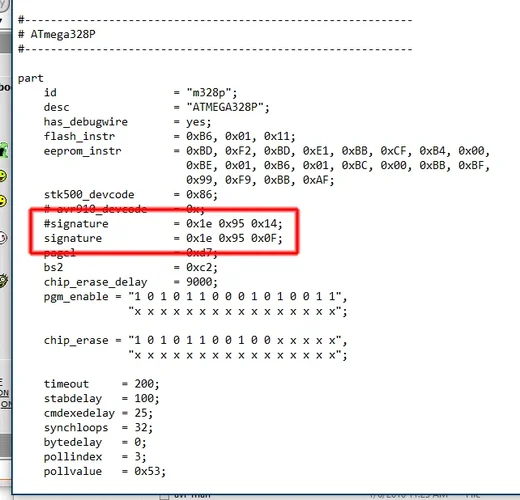
If you are using the P-PU version of the MCU, avrdude will complain about mismatched signature.
You will need to open avrdude.conf and edit is as shown in the attachment.
This replaces the signature, with one matching the P-PU suffix.




 News Umsturz 2026 - SequencerTalk 264 - die letzte in diesem Jahr - live